
Most mood trackers ask you to open an app, rate yourself on a five-point scale, pick from a wheel of 40 emotions, tag the activities, and write a note. It's a beautiful form and nobody fills it in on a bad day, which is precisely the day the data matters. The check-in that survives is the one that fits in a glance.
Three stickers, three widgets
- Create three custom stickers in Dayleaf: something like Bright, Even, Heavy. Pick a sun, a wave, a cloud — icons you'd understand without the label.
- Long-press your iPhone Home Screen, tap +, search Dayleaf, and add the small Sticker Stamp widget three times. Long-press each one → Edit Widget → choose its sticker.
- Arrange them in a row. That row is now your mood check-in: tap the one that fits, done.
What it looks like after a month
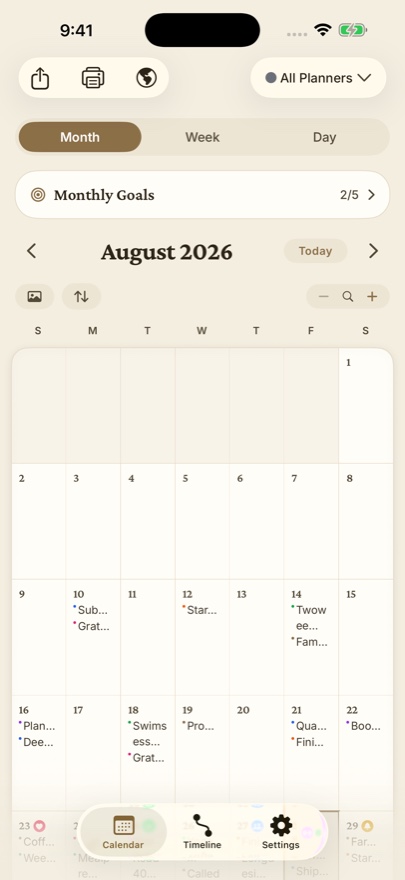
Open the month view. Every day carries its sticker beside the date. Heavy days cluster; you'll see it before you'd have said it. Tap Heavy on the timeline's filter bar and read the entries from those days — the ones with a sentence next to them explain themselves, and the pattern usually has a name: sleep, a person, a deadline, a season.
Add words only when you want to
The check-in is the floor, not the ceiling. On days you have something to say, the Today widget's New Entry drops you into the editor for that date, and on Apple Watch you can dictate a line without typing at all. Most days a sticker is enough. That's the design: the practice should be lighter than the mood.
For the clinically minded
If a therapist has asked you to keep a mood diary, this maps cleanly: the sticker is the rating, the entry is the situation-and-thought column, and the timeline filtered by sticker is the export you bring to the session. Dayleaf can email the whole journal as text or CSV from Settings.
