The short answer
Dayleaf is a planner and diary app built around a calendar: the journal that works like a paper planner. Your entries, photos, stickers and goals sit on the day they belong to, so each month of 2027 fills up the way a paper planner does. It suits people who think in days, weeks and months and want one place to plan ahead and look back. It runs on iPhone, iPad, Mac, Apple Watch and Android. It is free to start with unlimited entries, and Pro is a one-time $19.99 purchase for every Apple device (or $9.99 a year after a 7-day free trial).
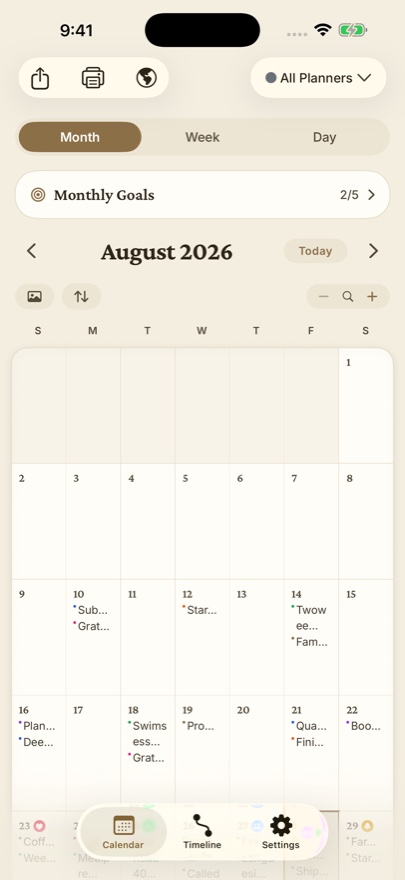
Month, week and day pages, like a paper planner
Dayleaf opens to a calendar, not a blank page. The month view shows a preview of what you wrote inside each day, the week view gives every day its own card, and the day view is one page for one day. Because it is a calendar and not a dated book, there is no 2027 edition to buy: next year's months are already there, and last year's stay where you left them.
Photos on the calendar
Attach photos to any entry and they appear on the calendar itself. Switch on photo mode and the month becomes a wall of pictures, and days without a photo show their text instead, so no day looks empty. While you write, the photos you took that day are offered in the editor, ready to attach with one tap.
Stickers
Birthday, Pay day, Trip, Deadline, Date night: stick them on any date like you would in a paper planner. There are 20 planner stickers, and you can design your own with your choice of icon and color (custom stickers are part of Pro).
Goals for the day, the week and the month
Set daily, weekly and monthly goals on the same pages as your entries, and use the Notes & Reflection space to write how it really went. It works like the review pages of a paper planner, which makes it a natural home for New Year's resolutions you want to check on in March.
On This Day
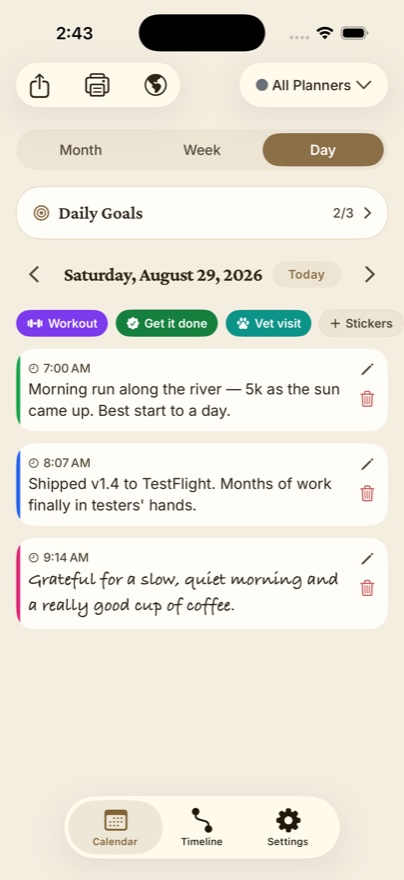
On This Day brings back what you wrote on the same date in earlier years. A journal started now pays you back every year after: by January 2028, each day of 2027 has something waiting for you.
Private by default
- Yours, on your device. Entries are stored on your device. No account is needed.
- No ads, and your data is not sold. We never read your entries, never sell them and never show you ads.
- Passcode lock. App Lock (Pro) guards the app with a 4-digit passcode, with a reset code by email if you forget it.
- Backup you own. One tap backs up entries, photos, voice notes and stickers to your own iCloud, or to your own Google Drive on Android. The same backup restores on iPhone, iPad, Mac or Android.
- Sharing is opt-in. The anonymous globe, The World Is Leafing, shares nothing unless you turn sharing on.
- What it is not. Journals are not end-to-end encrypted. If that is a requirement for you, Dayleaf is not the right pick.
Bring your old journal with you
If your past years live in Day One, Dayleaf imports the Day One JSON or ZIP export for free: entries, photos, videos and audio, on iPhone and on Android. Here is the step-by-step guide. Day One is the only importer today. Going the other way is open too: export as text or CSV for free, or as Markdown (one note per day) with Pro.
How to start your 2027 journal in five minutes
- Install Dayleaf. It is free on the App Store and Google Play, and you do not need an account.
- Pick a theme and name your planner. There are twenty themes, each with a light and a dark face.
- Mark the dates you already know. Flip to 2027 and stick stickers on birthdays, trips and deadlines.
- Set one goal for January. A monthly goal is enough to begin with. Add weekly and daily goals when you want them.
- Write one line today and set a daily reminder. You do not have to wait for January 1. A single line and a photo is a complete entry, and the reminder brings you back tomorrow.
Coming from Day One? Import your export from Settings, Import before step 3, and your earlier years land on the calendar too.
What it costs
| Free | Pro | |
|---|---|---|
| Price | $0 | $19.99 once for iPhone, iPad, Mac and Apple Watch, or $9.99 a year after a 7-day free trial, or $2.99 a month |
| Includes | Unlimited entries, all calendar views, search, goals, stickers, Day One import, backup | Every theme, custom stickers, per-planner fonts, 10 photos per entry, voice notes, the Apple Watch app, unlimited planners, App Lock, Year in Review |
On Android, Pro is also a one-time purchase on Google Play, never a required subscription.
Who it is not for
Dayleaf is not the best fit if you need a web app, a Windows app, end-to-end encrypted journals or a two-tap mood tracker.
FAQ
What is a good planner app for 2027?
If you like the way a paper planner fills up over a year, Dayleaf is a good fit. It is a journal that works like a paper planner: entries, photos, stickers and goals sit on month, week and day pages. It runs on iPhone, iPad, Mac, Apple Watch and Android, the free tier has unlimited entries, and Pro is a one-time $19.99 purchase for every Apple device.
Is Dayleaf free?
Yes, to start and to keep using. The free app includes unlimited entries, all calendar views, search, goals, stickers, Day One import and backup. Pro adds every theme, custom stickers, per-planner fonts, 10 photos per entry, voice notes, the Apple Watch app, unlimited planners, App Lock and Year in Review. Pro is $19.99 once for iPhone, iPad, Mac and Apple Watch, or $9.99 a year after a 7-day free trial, or $2.99 a month.
Do I have to wait until January 1 to start a 2027 journal?
No. Dayleaf is a calendar, not a dated book, so there is nothing to buy again each year and no first page to wait for. Start today, and the 2027 months are already there to plan in.
Can I use Dayleaf as both a planner and a diary?
Yes. Stickers and daily, weekly and monthly goals look ahead like a planner, and entries, photos and reflection notes look back like a diary. Both live on the same month, week and day pages.
Is my 2027 diary private?
Entries are stored on your device and backed up to your own iCloud (Google Drive on Android). Dayleaf shows no ads and does not sell your data, and no account is needed. App Lock (Pro) protects the app with a 4-digit passcode. Journals are not end-to-end encrypted.
Can I bring my old journal into Dayleaf?
If it is in Day One, yes: Dayleaf imports the Day One JSON or ZIP export for free, including entries, photos, videos and audio, on iPhone and Android. Day One is the only importer today.
Does Dayleaf work on Android as well as iPhone?
Yes. Dayleaf runs on iPhone, iPad, Mac, Apple Watch and Android. A backup made to Google Drive on Android restores on iPhone, iPad or Mac, and the other way round. There is no web app or Windows app.
Prices and features change; we last checked the details above on November 12, 2026. Comparing apps first? See the best Day One alternatives in 2026, Dayleaf vs Day One, Dayleaf vs Apple Journal · Dayleaf vs Journey · Dayleaf vs Diarium · Dayleaf vs Diarly · Dayleaf vs Daylio, or read about Dayleaf for Android.
