
Apple Journal comes free with iOS and, since iOS 26, runs on iPad and Mac too. For many people it is all they need. Dayleaf is for people who want their journal to look and work like a planner, or who need things Apple's app doesn't do.
At a glance
| Dayleaf | Apple Journal | |
|---|---|---|
| Price | Free tier with unlimited entries; Pro $19.99 once for iPhone, iPad, Mac and Apple Watch, or $9.99 a year after a 7-day trial | Free, built into iOS, iPadOS and macOS |
| Platforms | iPhone, iPad, Mac, Apple Watch, Android | iPhone, iPad, Mac (no Android, no web; no Watch app beyond State of Mind logging) |
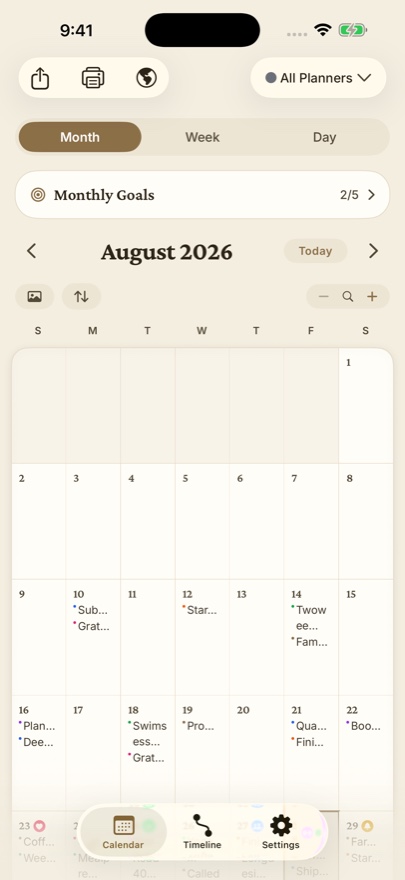
| Layout | Calendar first: entries, photos, stickers and goals live on month, week and day pages | A feed of entry cards; the calendar is a date picker, not a planner page |
| Day One import | Free: entries, photos, videos and audio | No built-in import |
Where Apple Journal is genuinely better
- Free and built in. Nothing to install or buy.
- Journaling suggestions from your photos, workouts, places and music, with prompts so you never start from a blank page.
- End-to-end encryption by default for your journal in iCloud.
- Handwriting with Apple Pencil on iPad, and State of Mind entries that sync with Health.
Where Dayleaf is genuinely better
- Month and week pages. Your writing sits on the day it happened, with photos, stickers and goals, so the calendar itself shows your year.
- Android and Apple Watch. Dayleaf runs on both; Apple Journal does neither.
- Bring your past, take it with you. Free Day One import (entries, photos, videos, audio) and export of all entries; Apple Journal has no import and exports HTML or PDF.
- Make it yours. Twenty themes, stickers, per-planner fonts, and daily, weekly and monthly goals.
Choose Apple Journal if…
you only want a free, private diary on Apple devices and like being nudged by suggestions.
Choose Dayleaf if…
you think in days, weeks and months, want planner-style pages with goals and stickers, use Android or an Apple Watch, or are bringing years of Day One entries with you.
FAQ
Is Apple Journal really free?
Yes. It ships with iOS 17.2 and later, and with iPadOS and macOS 26.
Can I import Day One into Apple Journal?
Not with a built-in tool. Dayleaf imports the Day One export for free, including photos, videos and audio.
Does Apple Journal have a calendar view?
It has a calendar for jumping to a date. Dayleaf's month, week and day pages are the journal itself.
Prices and features change; we last checked the details above on October 26, 2026. Comparing more apps? See the best Day One alternatives in 2026, Dayleaf vs Day One, Dayleaf vs Diarium · Dayleaf vs Journey · Dayleaf vs Diarly · Dayleaf vs Daylio.
