
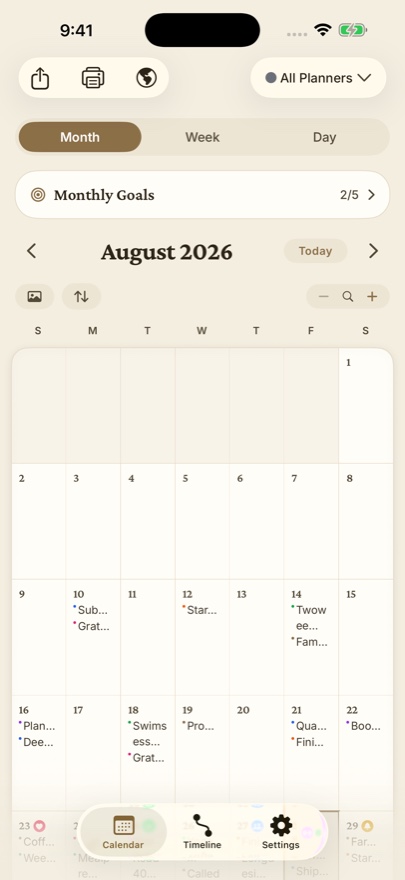
Most journal apps for Android are a feed: the newest entry on top, the past scrolling away underneath. Dayleaf is a diary on a calendar. Every entry sits on the day it happened, so a month fills up as you write and the calendar itself becomes your habit tracker. It is the same app as on iPhone, iPad, Mac and Apple Watch, built natively for Android with Material widgets and Google Drive backup.
What you get on Android
- Month, week and day pages. Write a line or a page; photos show up right on the calendar in photo mode.
- One line a day. A short entry is enough. The Timeline shows your whole story, newest first, and one tap shares the latest days as a card.
- Stickers, goals and planners. Stamp planner stickers on dates, keep daily, weekly and monthly goals, and keep work, home and travel in separate colour-coded planners.
- Photo journal. The photos you took that day sit right above the keyboard while you write.
- Home Screen widgets. Today's page with its goals, and one-tap sticker stamps.
- Google Drive backup. One tap saves entries, photos and voice notes to your own Google Drive. The same backup restores on iPhone, iPad and Mac.
- Day One import. Bring your whole Day One export home for free: entries, photos, videos and audio.
- Twenty themes, each with a light and a dark face, and a Year in Review.
- Works offline, no ads, no account needed. Pro is a one-time purchase, never a required subscription.
Who it is for
People who keep a daily diary, a gratitude journal, a five year journal, a travel diary or a bullet journal, and who want to see their month instead of scrolling through it. If you have tried diary apps with locks and passwords and found them cluttered with ads, Dayleaf is the quiet alternative: your writing, on a calendar, with nothing in the way.
Is Dayleaf for Android free?
Yes. Unlimited entries, all calendar views, search, Day One import and Google Drive backup are free. Pro adds unlimited planners, custom stickers, App Lock, Year in Review and all themes as a one-time purchase.
Does it sync with my iPhone or Mac?
Through the backup you own. Back up to Google Drive on Android and restore it on iPhone, iPad or Mac, or the other way round. There is no account to create and no server that holds your journal.
Can I move my journal from another app?
Day One exports import directly, with photos, videos and audio. Any other app that exports text can be pasted day by day, and Markdown export (one note per day) takes your journal back out whenever you want.
